f The Bugbytes

Welcome - Copyright & Disclaimer

We are moving from custom domain back to blogspot. If there are broken links please try adding blogspot.com instead of .com. Welcome to The Bug Bytes - a blog mainly for Papercrafting and some photography and other stuff thrown in here & there. Add in some die cutting machine, scrapbooking tools, cameras, scissors , glue and...... My name is Pam. If you have been redirected from papillondigitaldesign.blogspot.com you have come to the right place.Hope you get inspired by the projects, videos and files. Would love it if you could leave comments and become a follower. (Word verification is turned ON to avoid spam. Sorry for that inconvenience.) Would love it if you would also share your project here . If you find a linky under the post do share your project by posting link there or if you do not find a linky post your link in the comments.Thank you for visiting.

November 3, 2010

Christmas Cards with limited supplies

Hello Fellow Crafters,
This is Denine from PumpkinSpice, it is my pleasure and honor to be posted a little snippet on Pam's The Bug Bytes.  As one to the The Gyptians, I have learned so much from my fellow designers.  I would like to give a great big HUG and THANK YOU to all of you.  With all of the information on the Provo Craft products, It is like having a Tips & Tricks Encylopedia at your fingertips.

Ok, so on with my little craft.  I am currently in India so my supplies are very limited.  This is what I brought with me.


No cricut, no ATG, no Cuttlebug, but lots of paper... well 6 double-sided sheets and an accessory sheet. and some solid color cardstock.
So, I thought... well lets see how many cards I can make with this limited supply of paper.  Then time ran out... lol  But I did get 3 done with only 1 1/2 sheets of paper.  I will see if I can get more done before this is posted.

Here is what I was able to complete before the post.


Card #1


Recipe:
Paper -  "I Believe" Poinesetta Glittered Paper - I just love the glitter accents on this paper line.  So easy to work with.
Ribbon - Costco wired ribbon. - Again, I love Costco ribbon.  Sometimes it is too wide for most projects, but you simply can not beat the price.  50 yards for less than $7.... do I need to say anything else. 
Stickles - Diamond
Front Label and Poinesetta elements from "I Believe" Glittered Cardstock Accessories sheet.
and a simple sheet of white cardstock to write you Holiday Wishes.

Card #2


Recipe:
Paper - "I Believe" Poinesetta Glittered Paper - This card is again using the same paper. Just a little differently.
Ribbon - Costco wired ribbon. - Probably would have used a thinner ribbon for the tag if I were home.
I made a little pocket on the front with a scrap piece of the "I Believe" paper.

Card #3


Recipe:
Ribbon - Costco wired ribbon
Embellishment - Generic Glitter Glue for center of flower


Card #4


Recipe:
Paper - "I Believe" Thin Stripes Glittered Paper and Basic White cardstock
Ribbon - Costco wired Ribbon

Card #5


Recipe:
Paper - "I Believe" Dots Glittered Paper
Ribbon - Yep, Costco
Embellishements - Merry Christmas pocket, Button and Tree Border from "I Believe" Glittered Cardstock Accessories Sheet


Card #6


Recipe:
Paper - "I Believe" - Reindeer Glittered Paper , Basic white cardstock
Ribbon - Costco Ribbon


Card #7


Recipe:
Paper - "I Believe" Reindeer Glittered Cardstock again.  Dark Brown cardstock for the card base.
Ribbon -  Guess???  hehehe  Costco, both the red and gold.
Embellishment - Glitter Glue - generic from Fred Meyer


Card #8


This is a card I made for my husband, his birthday is on the 4th.  I tried to grab some more masculine papers when i packed quickly.  This turned out pretty good I think for limited supplies.
Recipe:


Ok, that is all I was able to complete.
Thanks for stopping by.
Big Blog Hugs,
Denine

November 2, 2010

Important Imagine update info - cricut sync version - 2.0.2.7

Here is what Chris from PC has posted in Imagine MB
"
The latest CricutSync software update (2.0.2.7), Imagine update (Version 96) and Content Update (version 0013) are available.

The CricutSync software update fixes the problem that Windows Vista 64 bit and Windows 7 64 bit users have had with updates. It will remove old drivers and load new drivers onto your computer. Full instructions can be found at:

http://www.cricut.com/imagine/support.aspx

The Imagine update has been out for a few days but was not accessable by those with 64 bit computer systems. It fixes an issue with relative sizing issues on Imagine cartridge layers. The issue still exists with Cricut cartridges though. This will be fixed with the next update.

The content update includes all cartridges released to date, including the new Smiley Faces cartridge. Most people will be able to update content by running the CricutSync software. A few people (myself included) will have to do a system restore in order to get the content loaded on. I have (hopefully) attached directions on how to do this."

Chris
Provo Craft

and here is system restore document - note for 64 bit users or those who do not get their content updated.Click on image to get in a bigger screen.
"


Also if you have trend antivirus software was to handle that. Adopt a similar way for others. This is also Chris's


I was inspired by the Harvest  Maiden picture I googled. See that stress on the word I. Obviously my younger son who was wants to lie down in bed beside me and read to give me company WAS NOT. All he could say was she is creepy. Well I did not think so.
It is my turn today at Tuesday Treats....
Now you all know that my back is gone for tossers the past week right? And so I have limited supplies. which my son was kind enough to get me. One of that was copic markers. My Imagine was also down. Still waiting for some cartridges but till then limited supply. But my  Gypsy was updated - Sometimes there is real blessing in having old technology :) and thank heavens to my XP and 32 bit - it updated!! So I made 2 cards - the pumpkin for October challenge and this. I cut out of cream cardstock - which I prefer when coloring as the slight cream color gives warmth to a picture. If I want real white then I can always use opaque marker.
As to cartridges used - keyword search and whatever I liked in the way of fruit got in. I also searched for wreath and added one in. Face - paper doll.
So I set cut only in settings - connected the G and cut. G shows Imagine connected and then
paper barely cut through
What?!!!
So I set blade depth to full 6  and went to Imagine - added some image from best friends - in the mat set the pressure to 5 ie max an speed to 4 (does not matter as the imagine like cake behaves with the G). And then tried the G - no communicating message. Grrr.. So I switched off checked for loose contact (only thing remotely loose was my brain :) ) and switched on without the Imagine cartridge and this time the thing went smoothly. So I cut and colored and glued and doodled. No bling!!! Just a cherry ribbon I had got from Michaels and never taken upstairs. Oh and the label  or frame and the flowers on the frame ? Well I tested a couple of frames from best friends to see if inside cuts so I just used ( 2- of same pink one reversed for main image and other right side printed up for the inside of the card. I snipped flowers from a different frame - green one. I think they are frompage 21 and 22)
See never give up your scissors (or using it) just because you get  some expensive machines. The always come handy.
Now the card itself is an easel card which is pretty simple to do but watch out for some boo boos
Score the card in half and score the front again - anywhere you want (preferably within half mark - from the opening end - not the folded end) and apply glue to only this area
Then make sure the front panel is exactly the same size as the folded card ( ie if you have folded a 5 1/2  X 8 1/2 then the folded card is 5 1/2  X 4 1/4so panel is also 51/2 X 4 1/4th) .
What am I saying?...
This should be better


Now my little boo boo which I had to correct -  I had the brilliant idea of making the green panel a quarter inch smaller and did just that and stuck it directly instead of cutting same size panel and I had lower portion with black outline an upper just green without back shadow.Oops!So removed the green - cut black - glued green on it and then on to the card (see the pic above and apply glue only to the folded glue area)

Here is the card


Printed a sentiment in word and adjusted the font size till it fit in that imagine test frame I had printed


My son still says face is nice mom but kind of weird having fruits on her hair.
Now don't you dare - and I mean DARE!!! agree with him - Don't you even think and more over no COMMENTS SAYING THAT!!
Hey!! Did you just...            :)

cricut sync troubleshoot for Gypsy

Since cricut sync now is for gypsy too
Here are the snap shots for troubleshoot when only G is connected
(remember to keep your G connected to AC power as you do not want the G running out of juice as these things take time)
Note question 1 and 2 in G sync has been merged so for cartridge problems there is only 1 question and for application problem there is anther question.Again do application only if there is a problem with application and as this sets everything back to factory settings you will have to re update and relink all cartridges.
(note cartridge however has the G serial number written on it and still can link only to this gypsy)

Initially to run cricut sync


If it fails to run properly the first time uncheck the protect box and run and try . Remember to check it back again when you open another program. Not safe otherwise.

Once you connect G


Then it checks updates and since mine is updated


Pressing ok will bring me to this screen


And choosing help


choose troubleshoot


Obviously since you have problem choose yes  - no will take you back to the project screen.

Now
Question 1)


If the problem is with cartridge like car decal not written right or something tells you that maybe the cartridge is not written right then choose this option and it will rebuild the cartridge meta data
saying yes


Saying
No  to question 1 ie are you missing cartridges
will take you to the next screen for
Question 2)
application (note question 1 & 2 in G sync is just 1 here after answering yes to troubleshoot of course - that does not count)


and yes will take you to


And this will reformat your G. So choose this answer with care. But sometimes when you zoom , search etc and it keeps jumping to welcome screen then you have no option but to choose this
I was inspired by the Harvest  Maiden picture I googled. See that stress on the word I. Obviously my younger son who was wants to lie down in bed beside me and read to give me company WAS NOT. All he could say was she is creepy. Well I did not think so.
Now you all know that my back is gone for tossers the past week right? And so I have limited supplies. which my son was kind enough to get me. One of that was copic markers. My Imagine was also down. Still waiting for some cartridges but till then limited supply. But my  Gypsy was updated - Sometimes there is real blessing in having old technology :) and thank heavens to my XP and 32 bit - it updated!! So I made 2 cards - the pumpkin for October challenge and this. I cut out of cream cardstock - which I prefer when coloring as the slight cream color gives warmth to a picture. If I want real white then I can always use opaque marker.
As to cartridges used - keyword search and whatever I liked in the way of fruit got in. I also searched for wreath and added one in. Face - paper doll.
So I set cut only in settings - connected the G and cut. G shows Imagine connected and then
paper barely cut through
What?!!!
So I set blade depth to full 6  and went to Imagine - added some image from best friends - in the mat set the pressure to 5 ie max an speed to 4 (does not matter as the imagine like cake behaves with the G). And then tried the G - no communicating message. Grrr.. So I switched off checked for loose contact (only thing remotely loose was my brain :) ) and switched on without the Imagine cartridge and this time the thing went smoothly. So I cut and colored and glued and doodled. No bling!!! Just a cherry ribbon I had got from Michaels and never taken upstairs. Oh and the label  or frame and the flowers on the frame ? Well I tested a couple of frames from best friends to see if inside cuts so I just used ( 2- of same pink one reversed for main image and other right side printed up for the inside of the card. I snipped flowers from a different frame - green one. I think they are frompage 21 and 22)
See never give up your scissors (or using it) just because you get  some expensive machines. The always come handy.
Now the card itself is an easel card which is pretty simple to do but watch out for some boo boos
Score the card in half and score the front again - anywhere you want (preferably within half mark - from the opening end - not the folded end) and apply glue to only this area
Then make sure the front panel is exactly the same size as the folded card ( ie if you have folded a 5 1/2  X 8 1/2 then the folded card is 5 1/2  X 4 1/4so panel is also 51/2 X 4 1/4th) .
What am I saying?...
This should be better


Now my little boo boo which I had to correct -  I had the brilliant idea of making the green panel a quarter inch smaller and did just that and stuck it directly instead of cutting same size panel and I had lower portion with black outline an upper just green without back shadow.Oops!So removed the green - cut black - glued green on it and then on to the card (see the pic above and apply glue only to the folded glue area)

Here is the card


Printed a sentiment in word and adjusted the font size till it fit in that imagine test frame I had printed


My son still says face is nice mom but kind of weird having fruits on her hair.
Now don't you dare - and I mean DARE!!! agree with him - And NO COMMENTS SAYING THAT!!
Hey!! Did you just...            :)

November 1, 2010

edited:New gypsy update 0206:0206

Please wait on this a bit and try going to g tech and see there live on what's happening.
Also Cricut sync  is for both Imagine and Gypsy and most probably will replace gyspsy sync soon when they get it working


This was sent as beta test to some.
Let me first tell you it had some problems and even these few managed o get the board down. So be glad that you weren't one.  First it was run through cricut sync and not gypsy sync.Yes - cricut sync is no just for Imagine. But cricut sync has still some problems with Mac and 64 bit though  not know with latest cricut sync as it changed on sunday
Anyway till now here is the procedure of
1) First keep your G on AC power. It may take a long while
2) run cricut sync and do not run g sync and cricut sync at the same time. Also do not connect Imagine to it. This way it will recognize the gypsy and check for updates
3) if you need to update drivers like adobe air - do so as cricut sync uses that!! Adobe air btw is a manager program for adobe flash and reader unless you have the full version - then bridge takes over
4)Keep trying as the site may keep winking out due to overload.

5) the update should have firmware and content
6) check wrench icon and version - it should read 0206:0206
first part is firmware and 2nd content
7) For many of us the firmware seemed to go fine. but are getting stuck on content. For some it's the other way
8) so if it is firmware that is the problem - list your OS specifying if yours is 32 or 64.to see this in computer start and in my computer - right click and go to properties - that should list your OS
9) if it is content then try doing update with G sync


10) and lastly unless you close G sync or cricut sync your G will say connected . That has not changed.So be sure to close  after the update is done.

Keep trying. If after updating your cartridge is red try troubleshooting once or twice chosing option 1 or 2 (ie yes to questions 1 or 2 . DO NOT CHOOSE yes to 3rd question) but some with 64 bit have reported problem so wait for a fix


Here is also a check list


1)connect the G to power as this may take a long time and you do not want to run out of juice
2) Make sure you are connected to the right USB drive. If this is your first time connecting try to see which is the USB 2.0 drive. If laptop ones on sides work well. But if desktop usually the one in the back is the right one
3) download cricut sync from http://www.cricut.com/imagine/support.aspx
and install. check no security measures are blocking it like popup blockers, antivirus. Usually firewall is ok if you have set option to ask you while installing. Sometimes after installations it will need the computer to restart. So shut down and restart. Do it anyway.
4)then run cricut sync .Make sure you are running as admin or with admin privileges
5) when connecting G to computer it should not take too long for cricut sync to recognize the device - not more than 5 - 10 mins max. See if the G shows connected. It should not be on the welcome screen. If not try closing and then unconnecting the G then running cricut sync and when it shows no device then connect G.
Server might be busy so keep trying.
6)Make sure you are connecting just the Gypsy and not the Imagine an do not run G sync and cricut sync at the same time
7)If yours gets updated check if g version shows (0206:0206).If either is not correct then your update did not go through ok. Some have had success doing the firmware with cricut sync and then trying the content with G sync
8) If nothing works (NOTE MAC USERS - you have to still wait for update. 
Also PC CS has said to one of the MB members who called that Trend Micro has problems and needs to be uninstalled. I would wait on this a bit as uniNstalling antivirus is not the way to go and is risky!! find a friend who doesn't use this would rather be the way to goLOL 
edited: exiting the trend by right clicking and then installing the cricut sync and running has met with many successes) Call PC CS


Ok now here are some pics for the cricut sync


which can be downloaded from
http://www.cricut.com/imagine/support.aspx


see the site for instructions. Turn off your firewall and install drivers if asked for. Also remember to 
turn off pop up blocker and always when installing software do it as administator with admin privileges


Now for some screen shots


If asked to replace do so if you have previous version like I did - do so


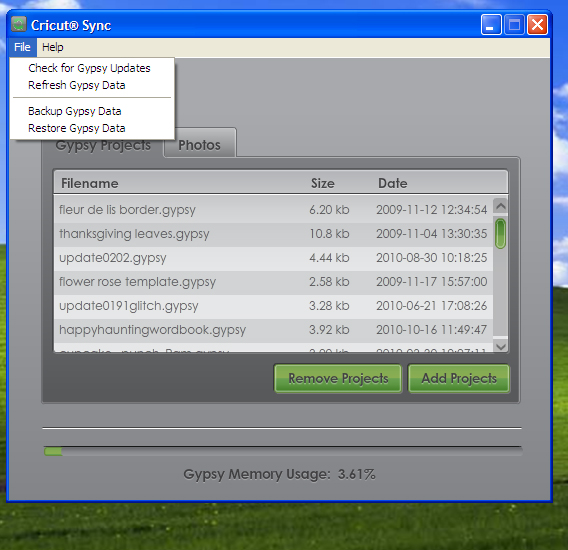
run the cricut sync


It will automatically check for updates and if you have none it will say so like mine here did


If for some reason it fails to do so then go to file and choose check updates


If the firmware update is done and content has problem try doing with gypsy sync. If update goes on fine then you can see the updates version by clicking on the help and then about


See you need not check G fr version - about tells you
and you can also troubleshoot (both Imagine and G ( from cricut sync though for now I would prefer you to troubleshoot from gypsy sync)